
You can add money to your Bella&Bona Wallet at any time.
This allows you to pay for meals quickly without entering your card details for every order.
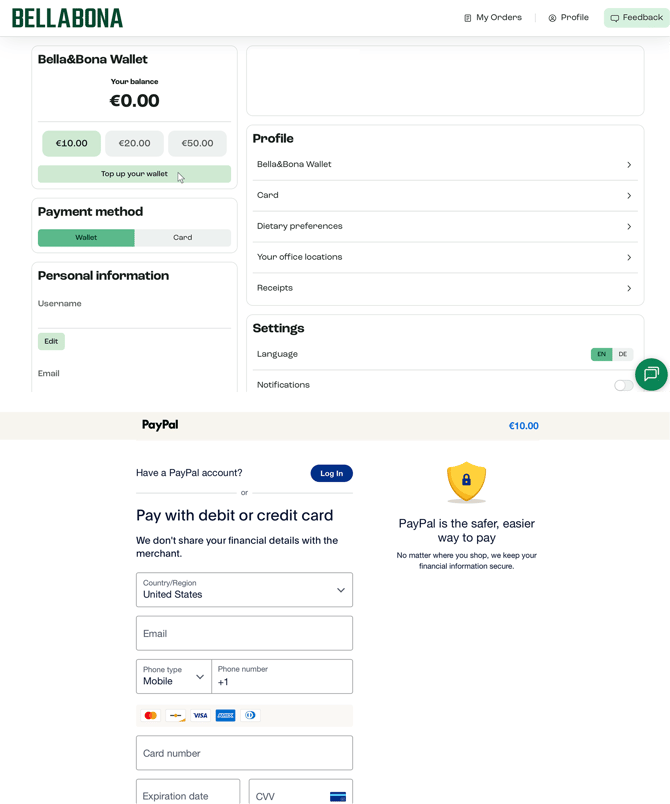
On Desktop (ecom.bellabona.com)
- Log into your account.
- Go to Profile.
- Click on Bella&Bona Wallet.
- Select the amount you want to add (€10, €20, €50).
- Confirm the payment.
Your balance will update immediately after the transaction is completed.
On Mobile App (iOS & Android)
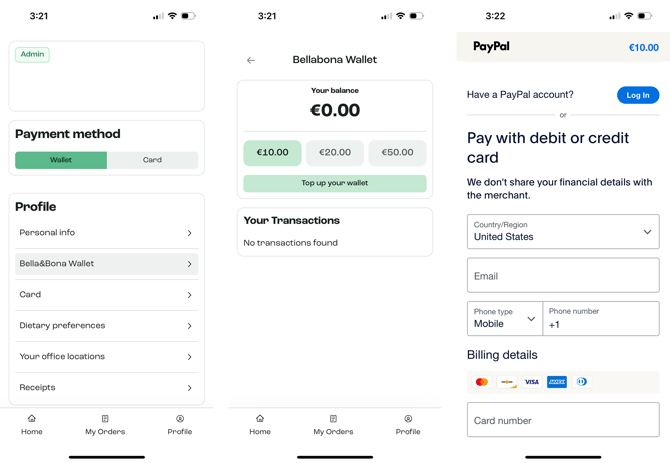
- Open the Bella&Bona app.
- Go to Profile.
- Tap Bella&Bona Wallet.
- Choose the amount you want to add.
- Confirm the payment.
Your updated balance will be visible instantly.
Important
- Wallet top-ups are processed immediately.
- Your company’s meal allowance is applied separately per order.
- If your Wallet balance is insufficient, your connected credit card will be charged.
Using the Bella&Bona App?
For a smoother experience, we recommend using the Bella&Bona mobile app.
Download here:
iOS (App Store)
https://apps.apple.com/us/app/bella-bona/id6755871557
Android (Google Play)
https://play.google.com/store/apps/details?id=com.bellabona.ecom.twa&hl=en
The app allows you to:
• Add money quickly
• View your Wallet balance
• Manage payment methods
• Place orders faster
Payment failed?
If your payment does not go through:
- Double-check your card details
- Ensure online payments are enabled
- Contact your bank if needed
Still unsure?
If the issue continues, please contact our support team:
questions@bellabona.com
Please include:
• A screenshot of the error• The device you’re using (desktop or mobile)
• The browser (Chrome, Safari, etc.)
This helps us resolve the issue quickly.