
If you see “Wallet” in your profile or during checkout, this refers to your Bella&Bona Wallet.
The Bella&Bona Wallet is your personal balance inside the platform.
It allows you to pay for meals quickly without entering your card details every time.
Your company’s meal allowance is automatically applied to each order.
If there is a remaining amount, it will be covered by:
- Your Wallet balance
- Or your connected credit card
Where can I see my Wallet balance?
On Desktop (ecom.bellabona.com)
- Log into your account.
- Go to Profile.
- Click on Bella&Bona Wallet.
- Your current balance is displayed at the top.
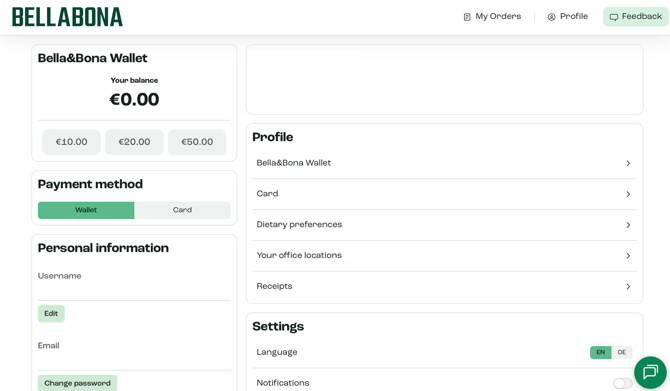
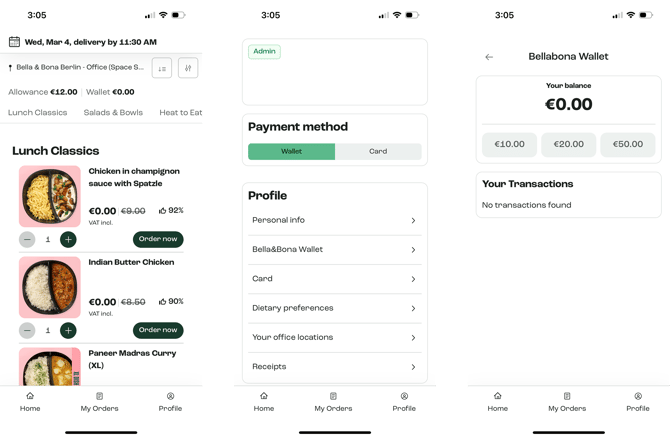
On Mobile App (iOS & Android)
- Open the Bella&Bona app.
- Go to Profile.
- Tap Bella&Bona Wallet.
- Your balance appears at the top of the screen.
When is my card charged?
Your credit card is charged only if:
- Your Wallet balance is insufficient
- You manually add money to your Wallet
Your company allowance is always applied first.
Using the Bella&Bona App?
For a smoother experience, we recommend using the Bella&Bona mobile app.
Download here:
iOS (App Store)
https://apps.apple.com/us/app/bella-bona/id6755871557
Android (Google Play)
https://play.google.com/store/apps/details?id=com.bellabona.ecom.twa&hl=en
The app allows you to:
• View your Wallet balance
• Add money instantly
• Manage your payment methods
• Place orders faster
Still unsure?
If something doesn’t look correct in your Wallet balance or transactions, please contact our support team:
questions@bellabona.com
Please include:
• A screenshot of your Wallet page• The device you’re using (desktop or mobile)
• The browser (Chrome, Safari, etc.)
This helps us resolve the issue quickly.